



Karnataka MobileOne brings together services of multiple state and central government departments as well as private service providers. Services include government services like utility bill payments, income and property tax payment, SAKALA services, bus and railway ticket booking, application for various government services and private services in the categories of healthcare, banking, travel, legal, agriculture and other areas.
Payments on MobileOne may be made through any of the payment methods such as Credit Card (Visa/ MasterCard, American Express), Internet Banking, Debit Card (Visa/ MasterCard, Maestro, RuPay), IMPS, Cash Cards and Telecom Wallets provided by Karnataka MobileOne.
Utilities View or pay utility bills for services like water. Choose from service providers .
Procedure to pay bills through mobile app
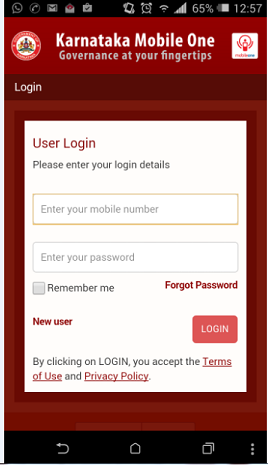
1. Login Screen :Login with a valid mobile number and password. New users can register using the New User link available in the app
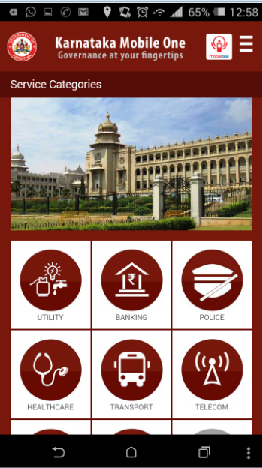
2. Once logged in, the user would be redirected to the Services screen. To pay Water bills, Select Utility from the categories shown
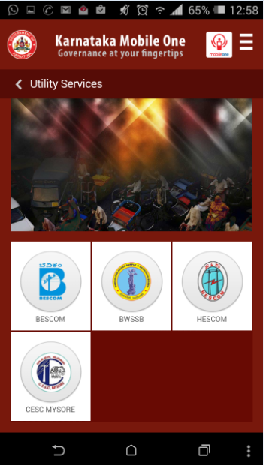
3. On selection of Utility, The Service providers list is available. Click on BWSSB to pay bills
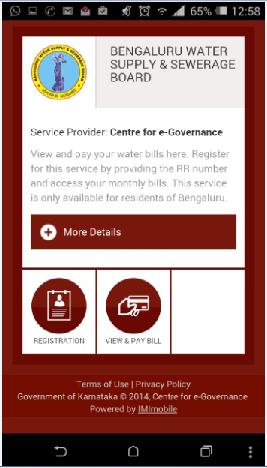
4. On selection of BWSSB link, The below screen appears. Click on view and Pay bill link to proceed.
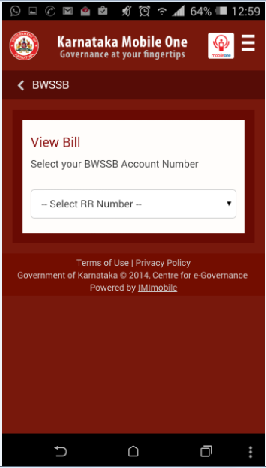
5. The View Bill Screen is displayed . Select the RR number and this redirects to the Payment screen where the bill payment can be made.
The mobile app can be downloaded from Google play store or alternatively at the below link
https://play.google.com/store/apps/details?id=com.imi.karnatakamobileone&hl=en

